
As a regular Terraria player, I still find myself coming back to the Nintendo Switch version in 2026, especially when a friend wants to jump in for a couch co-op session. That experience would not be the same without the split-screen update that landed on the Switch years ago. I remember the excitement when version 1.0.7 arrived, bringing two-player split-screen to docked mode, and honestly, it remains one of the best reasons to keep the game installed on my console today.
Terraria is one of those games that just keeps giving. It blends building, painting, crafting, exploration, and combat in a sprawling 2D world. Before that Switch patch, the game had already gone through a massive content drop called Journey’s End earlier that same year. That update added new items, fresh enemies, two brand-new difficulty modes, and a handful of other gameplay features that made the world feel deeper than ever. But on a console like the Switch, playing solo could sometimes feel like a lonely grind. The split-screen feature changed that completely.
According to the developer’s notes at the time, version 1.0.7 on the Switch introduced a proper co-op mode through split-screen. To get it working, you need a second pair of controllers for the second player, plus a separate Nintendo account on the system. Once the game starts, player two can simply activate their controller, and that person drops into the world right beside you. After both players are settled, the screen automatically splits so each person gets their own view of the action. It is a simple setup, but it works surprisingly well in practice.
Here is a quick breakdown of how I usually get split-screen running on my own Switch:
| Step | Action |
|---|---|
| 1 | Make sure the console is docked. Split-screen does not work in handheld or tabletop mode. |
| 2 | Sync a second controller or pair of Joy-Cons for player two. |
| 3 | Select the second player’s Nintendo account when prompted. |
| 4 | Start or load a Terraria world as player one. |
| 5 | Player two activates their controller to join the session. |
| 6 | The screen switches to split-screen automatically. |
I have used this feature countless times since it was added, and it still feels great in 2026. With two people on the same screen, the workload shrinks dramatically. One player can focus on mining and gathering resources while the other builds a base or explores a dangerous cave. Boss fights become more manageable when someone can distract enemies while the other attacks from range. Even simple tasks like sorting chests or crafting potions feel less tedious when you can divide them between two players.
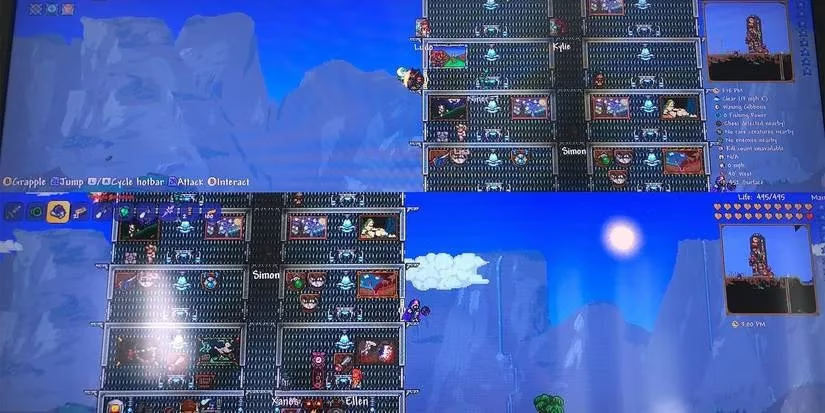
The biggest advantage is the sense of shared progress. Instead of passing a single controller back and forth, both players can move, build, and fight at the same time. That makes the world feel alive and cooperative in a way that solo play simply cannot match. Sure, the split-screen view can feel a little cramped on a smaller TV, but the trade-off is absolutely worth it for a proper couch co-op evening.
Looking back from 2026, I appreciate how this patch kept Terraria relevant on the Switch long after its initial release. Many games come and go, but a well-implemented local co-op mode gives people a reason to keep returning. Even now, when I invite someone over and we cannot decide what to play, Terraria split-screen often ends up being the answer. The patch was originally made available for the Nintendo Switch as version 1.0.7, and it delivered exactly what fans wanted: a simple, reliable way to explore, build, and fight together in the same room.
If you have not tried split-screen mode in a while, I recommend setting it up again. Grab a friend, dock the Switch, sync those controllers, and start a fresh world. The magic of Terraria is even better when you do not have to dig, build, and battle alone. After all these years, that local co-op update still stands as one of the smartest additions to the Switch version, and it remains a highlight of my own multiplayer gaming sessions in 2026.